Quote 113 Life Carriers Without Leaving the CRM.
Term, whole life, IUL, GUL, return of premium, and final expense, ranked by premium with underwriting eligibility on every row. Every quote saves to the contact, and it is included on every plan.
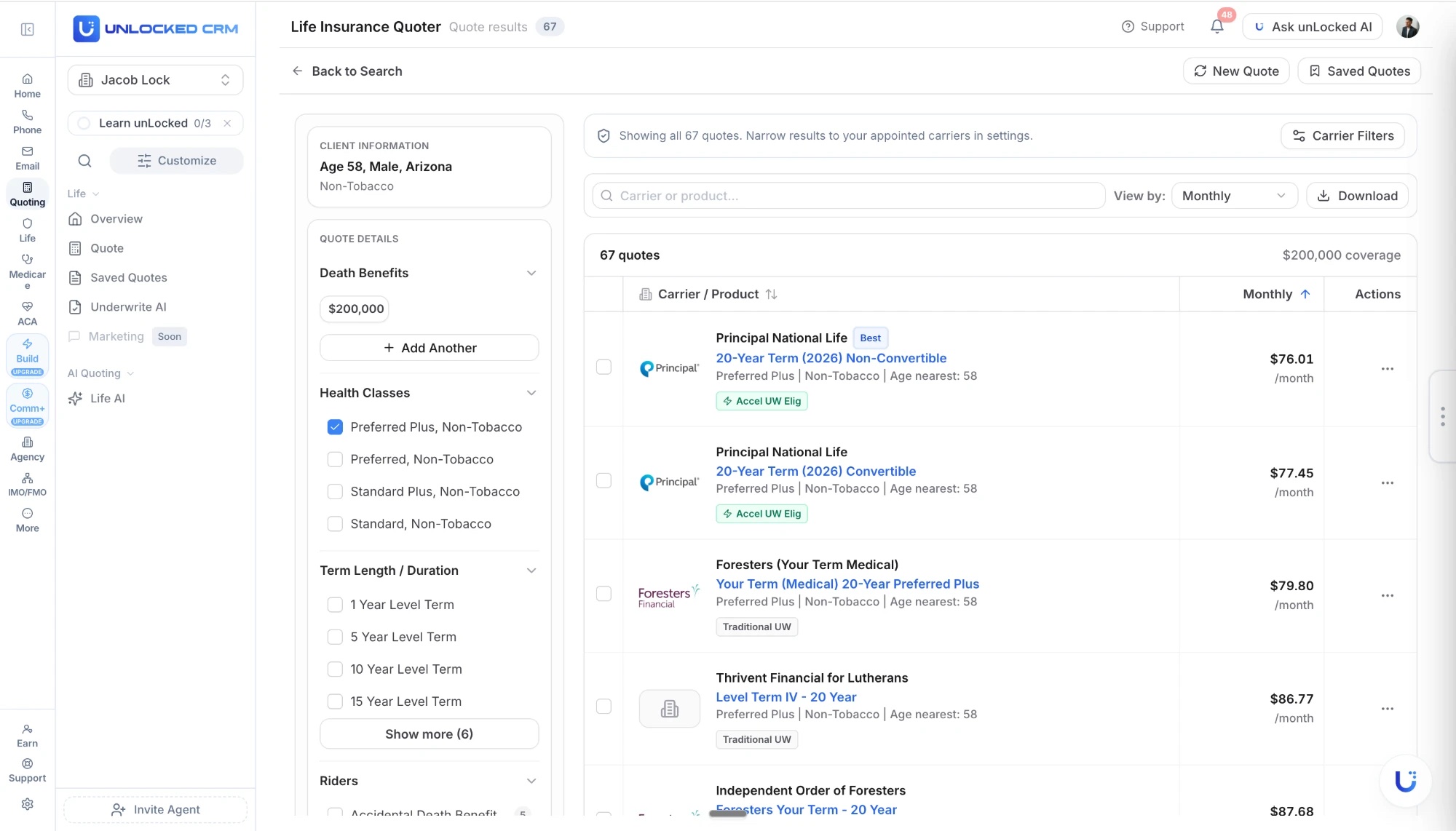
Enter the Client Once. Compare the Whole Market.
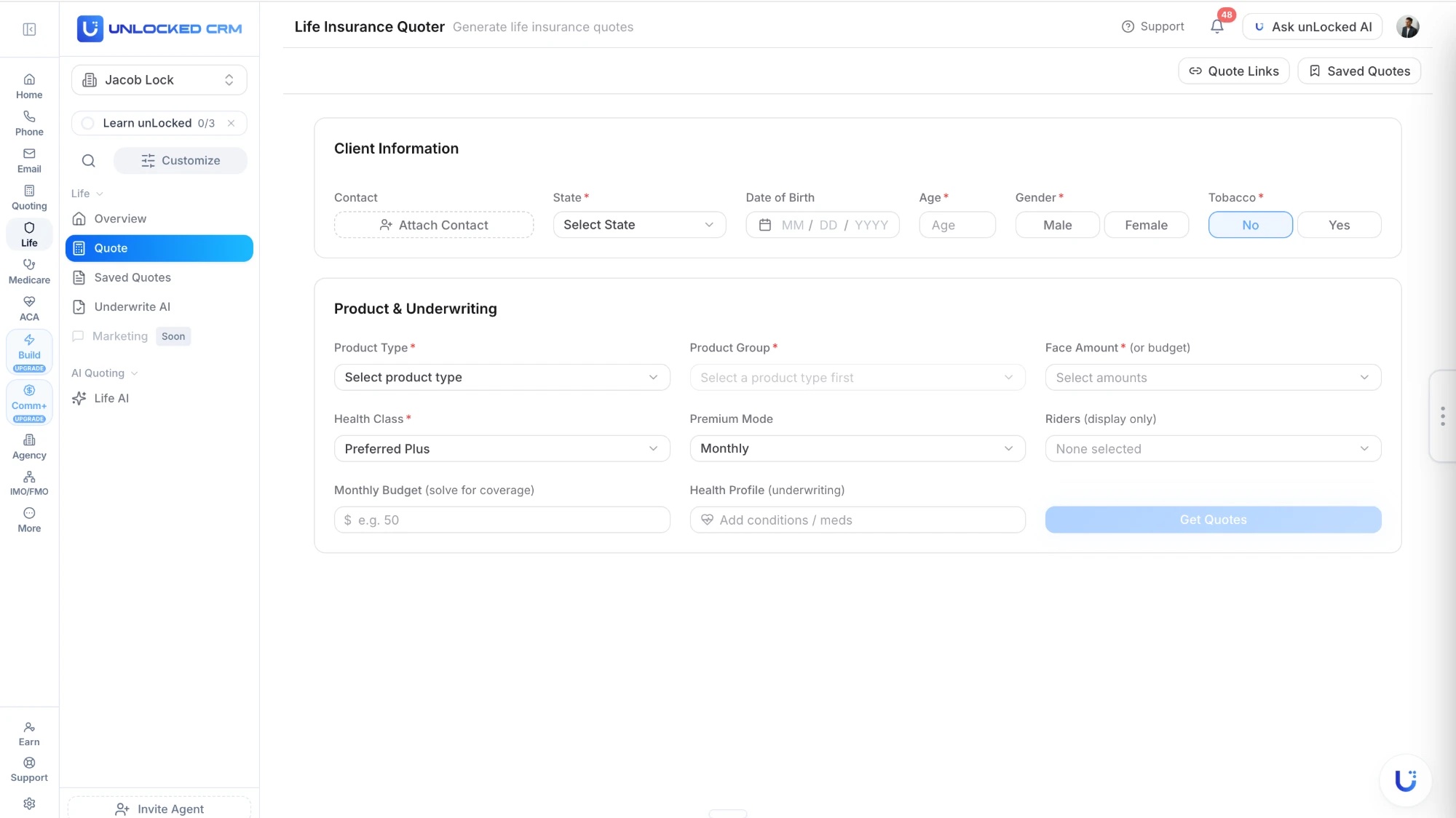
The quoter opens from the contact record, so the case details are already there. You add the coverage and the term, and the market comes back ranked.
What you enter
- State, age, gender, and tobacco status
- Face amount, or a monthly budget to solve for coverage
- Health class, from Preferred Plus to Standard
- Term length or permanent product type
- Premium mode, riders, and health profile for underwriting
- Attached to the contact, so most of it prefills
What you get back
- Every matching carrier ranked by monthly premium
- Product name, term, and health class on each row
- Accelerated or traditional underwriting flagged per product
- Filter to the carriers you are appointed with
- Search by carrier or product, sort by premium
- Download the PDF, or send the quote by email or SMS
Every Life Product Your Clients Ask For.
One quoter for the whole life book, not a separate tool for term and another for permanent.
Term life
1 to 30 year level term, convertible and non-convertible, across the carriers that write it.
Whole life
Participating and non-participating whole life with guaranteed premiums and cash value.
Indexed universal life
IUL with market-linked growth and downside protection, compared on premium and illustration.
Guaranteed universal life
GUL for permanent coverage at lower premiums than whole life.
Return of premium
ROP term that refunds premiums at the end of the level period.
Final expense
Simplified and guaranteed issue final expense for the clients who need a fast, small policy.
The Life Insurance Workflow, Lead To Commission
How a case moves from first contact to commission on one client record, and what the AI handles along the way.
See all 12 lines on Insurance Workflows By Product Line.
New In November 2026
Recently shipped here. Every release is on the Product Updates page.
Life Quoting On Phones And Tablets
Life quoting now works on phones and tablets, and Medicare Supplement and ancillary are in the mobile quoter.
Final Expense Quotes Through Moonlight
Final expense quotes are now available through Moonlight.
Life Quote Link Adds Guaranteed UL, Guaranteed Issue, ROP Term, And SI Term
The Life Quote Link now includes Guaranteed Universal Life, Guaranteed Issue, Return of Premium Term, and Simplified Issue Term.
From Client Info to Application in Three Steps.
01
Enter the client once
Open the quoter from the contact. Age, state, and health details carry over, so you fill in the coverage and term and run it.
02
Compare the whole market
113 carriers ranked by premium, with underwriting eligibility on each row and a filter for your appointed carriers.
03
Send and submit the e-App
Download the branded PDF or send the quote by email or SMS, then submit the e-App inside unLocked for 125 e-App carriers, prefilled from the quote.
Built for Life Producers.
Speed on the quote, and no re-keying between the quote, the PDF, the eApp, and the commission that follows. Your state licenses and carrier appointments load from one NPN and stay current, so you know what you can write before the quote starts — see Licensing & Appointments.
Health profile imports with the contact
Attach a contact and their health conditions, surgeries, medications, height, weight, and tobacco use load into the quote. Health Class reflects their build and conditions instead of defaulting to Preferred Plus, with a warning when your selection does not match the profile. Override anything without touching the contact record.
113 life carriers
Term, whole life, IUL, GUL, ROP, and final expense from the carriers producers actually write.
Rates updated daily
Premiums come from current carrier rate tables, so the number you present is the number on the application.
Side-by-side comparison
Sortable columns for premium, product, and carrier, with search and appointed-carrier filtering.
Underwriting flags on every row
See which products are eligible for accelerated underwriting and which go the traditional route before you pick one.
Branded PDF quotes
Download a client-ready comparison with your name, logo, and contact details already on it.
e-Apps submitted inside unLocked
Once the client picks a carrier, submit the e-App from the quote for 125 e-App carriers, prefilled from the case. Other carriers get a carrier application link.
Three Ways to Quote Life.
Same 113 carriers, same client record. Pick the path that fits the moment.
The standard quoter
Every plan
Form-based, side by side, unlimited quotes with no per-quote fee. What you see on this page.
Life Quote AI
Pro
Describe the client in plain English and get carrier recommendations. unLocked AI can run it from chat or by voice.
Your life quoting link
Every plan
A custom link with your name, headshot, and logo. The client quotes themselves and lands in your CRM as a lead with the quote attached.
Life Quoting FAQ
How many life insurance carriers can I quote?
113 life insurance carriers from one screen, covering term, whole life, IUL, GUL, return of premium, and final expense products.
What happens when I attach a contact to a quote?
The contact's health profile imports into the quoter: health conditions, surgeries, medications, height, weight, and tobacco use. Health Class is set from their build and conditions instead of defaulting to Preferred Plus, and conditions and medications narrow the results to suitable carriers. You can override any imported value without changing the contact record, and attaching a different contact clears the previous health data and loads the new one.
How is client health information handled?
Health data follows the same PHI handling pattern as our Medicare and ACA quoting. Imported values live on the quote, and overriding them in the quoter never changes the contact record.
Are the rates current?
Yes. Rates are updated daily from carrier rate tables so you present current pricing to clients.
What life insurance products are supported?
Term life (1 to 30 year level), whole life (participating and non-participating), indexed universal life (IUL), guaranteed universal life (GUL), return of premium, and final expense or simplified issue.
Can I see underwriting eligibility before I quote?
Yes. Each product in the results shows whether it is eligible for accelerated underwriting or goes the traditional route, and Underwrite AI can give rate-class guidance from a chat before you run the quote.
Can I send the quote to the client?
Yes. Download a branded PDF comparison with your name, logo, and contact details, or send the quote to the client by email or SMS from the results screen.
How do I submit the application?
Once the client picks a carrier and product, submit the e-App inside unLocked. The e-App carrier sheet on this page lists the 125 carrier and product listings you can submit through the platform, prefilled from the quote; other carriers get a carrier application link. The quote and application stay on the client record.
Is there a cost for the life quoting engine?
No. The life quoter is included on every unLocked CRM plan, priced per user, with unlimited quotes and no per-quote fee.
Can clients quote themselves?
Yes. Every agent gets a custom life quoting link branded with their name, headshot, and logo. The client runs the comparison and lands in the CRM as a lead with the quote attached.
Choosing Life Insurance Quoting Software
Life insurance quoting software for agents should compare carrier premiums using the client's coverage goals and underwriting profile, then keep the comparison with the client record. unLocked combines term life, whole life, IUL, GUL, return of premium, and final expense quoting across 113 life carriers with health-profile import, saved quotes, branded PDFs, and life e-Apps.
- Match the client's state, age, tobacco use, health class, coverage amount, and product before comparing premiums.
- For term life, compare the same face amount and term length; for final expense, review eligibility and the product's benefit limitations.
- For whole life and IUL, review carrier illustrations and guaranteed versus non-guaranteed values instead of treating premium alone as the recommendation.
- Keep the selected quote, client communication, application, and issued policy connected rather than exporting a comparison into a separate spreadsheet.
Check It In A Demo
Attach a contact with a saved health profile, run a term or final expense comparison, inspect the imported health class, override it if needed, and save a branded comparison to that contact.
A quote is not an underwriting approval. Carrier eligibility, final rate class, illustrations, and application availability must be reviewed. Connected AI can run supported quotes but cannot start an application; live e-Apps are completed inside the CRM.