Quote Medigap From a ZIP Code. Enroll Without Leaving the CRM.
Every standardized plan from every carrier in the client's area, sorted by premium with the rating method on each card. Send the quote by PDF, email, or SMS, then enroll the client directly in unLocked through 264 e-App carriers. Included on every plan.
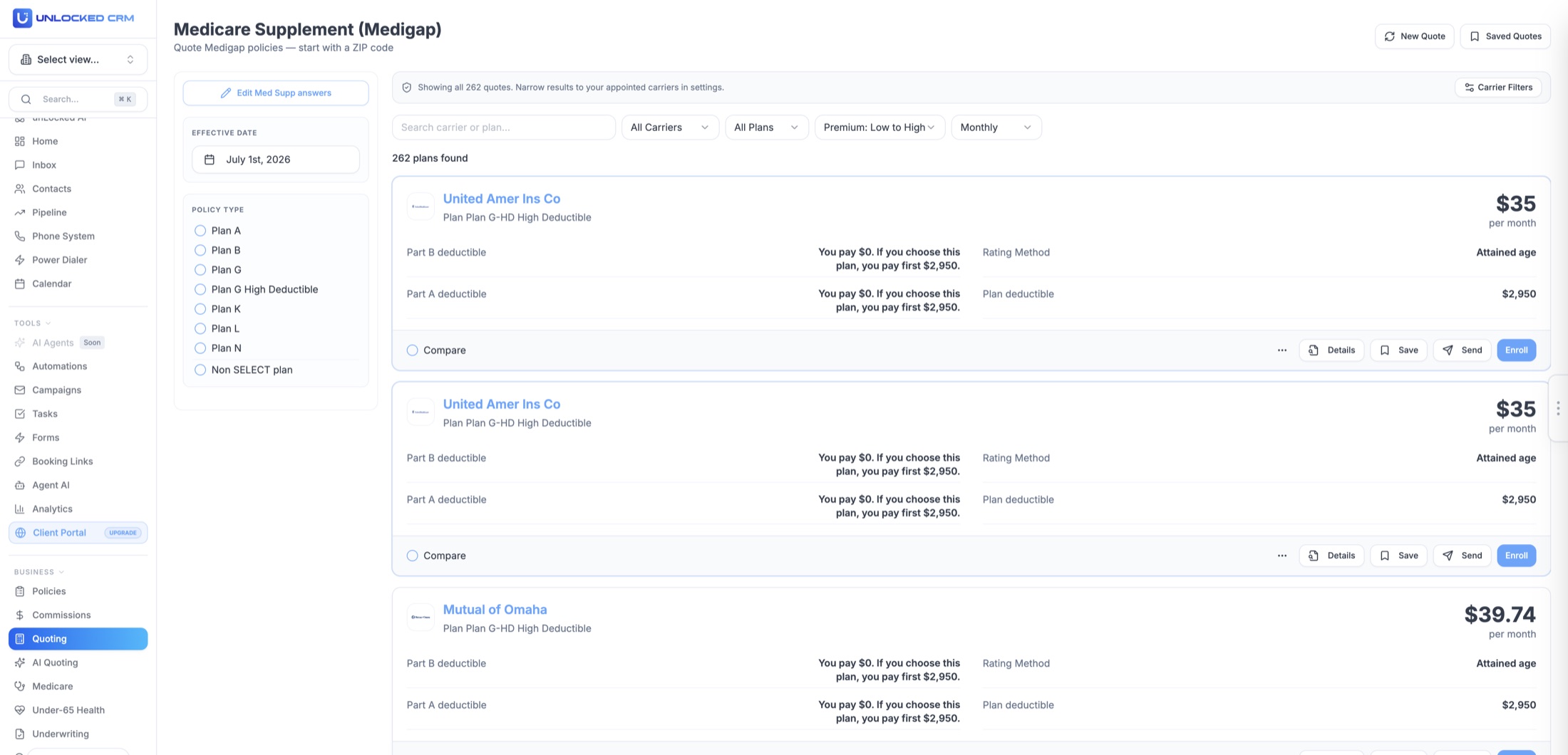
Every Plan Letter, Every Carrier, One Screen.
Medigap plans are standardized, so the comparison is about premium, rating method, and carrier. The quoter puts all three on every card.
Start with a ZIP code
ZIP, effective date, age, gender, and tobacco status, prefilled from the contact. The quoter returns every carrier writing Medigap in that area.
Every standardized plan
Plan A through Plan N, including high-deductible G and non-SELECT options, and state-specific plans for Wisconsin, Minnesota, and Massachusetts.
Rating method on every card
Attained-age, issue-age, or community, plus the plan deductible and what the client pays toward the Part A and Part B deductibles.
Sort and filter
All carriers or one, all plans or a letter, premium low to high, monthly or annual, and a filter for the carriers you are appointed with.
Carrier ratings and discounts
Carrier rating and household discounts noted on the card, so the recommendation is about more than the lowest number.
Compare, send, enroll
Tick plans to compare, download the PDF, send the quote by email or SMS, and enroll the client directly in unLocked from the plan card.
Enroll Directly in unLocked Through e-App Carriers.
Medicare Supplement is the line where the enrollment happens inside the CRM. Pick the plan, open the e-App from the card, and the application is already filled in.
Enroll from the plan card without leaving unLocked
The e-App is prefilled from the contact and the quote
Enrollment status shows on the client record
Carriers not on e-App still get the carrier application link
Download the Medicare Supplement e-App carrier sheet
All 264 carriers you can enroll through unLocked, by name. Useful for checking your appointments against the list, or for showing a team what they can write without leaving the CRM.
The Medicare Supplement Workflow, Lead To Commission
How a case moves from first contact to commission on one client record, and what the AI handles along the way.
See all 12 lines on Insurance Workflows By Product Line.
Eligibility Detected Before You Quote.
Whether the client can enroll without health questions decides the conversation. The quoter works it out from the record first.
Open Enrollment detection
The quoter identifies the client's six-month Medigap Open Enrollment window from their Part B date, when no health questions apply.
Guaranteed Issue flags
Guaranteed Issue situations are flagged so you know when the client can move carriers without underwriting.
State Birthday Rules
Birthday Rule alerts for California, Missouri, Oregon, Illinois, and the other states that allow an annual plan change.
Underwriting pre-qualification
For underwritten cases, carrier-specific eligibility screening tells you which carriers will take the client before you apply.
Drugs, Pharmacies, and Doctors, On the Same Record.
A Medigap client usually needs a Part D plan too. Add the client's drugs, pharmacies, and providers once on any Medicare quoter, with AI Drug Assist and AI Doctor Assist structuring the lists, and the Part D quote is ready to run.
Paste or upload
Paste a text list or upload an image of medications, pharmacies, or providers.
Voice
Dictate the list during the client call and AI structures it.
Photo
Snap pill bottles, a pharmacy printout, or a referral sheet.
Quote, Compare, and Enroll in Four Steps.
01
Open the client record
ZIP, date of birth, gender, tobacco status, and Part B date carry into the quoter, and the eligibility window is already known.
02
Run the Medigap quote
Every plan letter from every carrier in the area, sorted by premium, with rating method and deductibles on each card.
03
Compare and send
Tick plans to compare, then download the branded PDF or send the quote to the client by email or SMS.
04
Enroll in unLocked
Enroll the client directly from the plan card through the e-App carriers. The quote and the enrollment stay on the record.
Built for Real Medicare Workflows.
The pieces around the quote that usually live in three other tabs.
Branded PDF quotes
Every comparison PDF carries your logo, name, NPN, and phone without any formatting on your end.
e-App enrollment inside unLocked
Enroll directly from the quote through the e-App carriers, with the application prefilled from the contact.
Carrier links and plan documents
Carrier application links and uploaded plan documents are attached to the quote results, the plan preview, and the comparison.
Medigap versus Medicare Advantage
Quote both from the same Medicare record and compare flexibility, network, and cost side by side for the client.
Annual reviews and rate increases
Rerun the comparison at renewal from the saved quote, with Birthday Rule and Guaranteed Issue windows flagged.
Included on every plan
The Medigap quoter and e-App enrollment are listed on Free, priced per user, with unlimited quotes and no per-quote fee.
Three Ways to Quote Medicare.
Same plans, same client record. Pick the path that fits the moment.
The Medigap quoter
Every plan
Form-based, ZIP-level Medicare Supplement quoting with e-App enrollment, unlimited and with no per-quote fee. What you see on this page.
Medicare AI
Pro
Describe the client in plain English and get plan recommendations. unLocked AI can run it from chat or by voice.
Your Medicare quoting link
Every plan
A custom link with your name, headshot, and logo. The client quotes themselves and lands in your CRM as a lead with the quote attached.
Medicare Supplement FAQ
Which Medigap plans can I quote?
Every standardized plan, A through N, including high-deductible Plan G and non-SELECT options, plus the state-specific plans in Wisconsin, Minnesota, and Massachusetts, from the carriers writing in the client's ZIP code.
Can I enroll the client in unLocked?
Yes. Enroll directly from the plan card through the e-App carriers, with the application prefilled from the contact and the quote. The carrier sheet on this page lists the 264 Medicare Supplement e-App carriers. Carriers not on e-App still get a carrier application link from the card.
How do I send the quote to the client?
Download a branded PDF or send the quote to the client by email or SMS from the results page. It is saved to the contact next to the Medicare Advantage and Part D quotes.
Does the quoter know when the client can enroll without health questions?
Yes. It identifies the Medigap Open Enrollment window from the Part B date, flags Guaranteed Issue situations, and alerts you to state Birthday Rules. For underwritten cases, carrier-specific screening shows which carriers will take the client before you apply.
Can I add the client's drugs, pharmacies, and doctors?
Yes, on every Medicare quoter. Add them by pasting a list, speaking it, or photographing a pill bottle, pharmacy printout, or referral sheet, and AI structures the entries. On a Medigap client they feed the Part D quote that usually goes with it.
Is the Medigap quoter included?
Yes. It is included on every unLocked CRM plan, priced per user, with unlimited quotes. Medicare AI, the plain-English version, is on Pro.
Can clients quote themselves?
Yes. Every agent gets a custom Medicare quoting link branded with their name, headshot, and logo. The client runs the comparison and lands in the CRM as a lead with the quote attached.
Choosing Medicare Supplement Quoting Software
Medicare Supplement quoting software compares Medigap premiums for the client's ZIP code, age, and eligibility. unLocked shows standardized plan options, rating methods, discounts, and enrollment-window guidance, with branded quote delivery and e-App enrollment for supported carriers. Medigap comparison is distinct from Medicare Advantage and usually requires a separate Part D review.
- Compare the same plan letter and distinguish attained-age, issue-age, and community-rated premiums.
- Check household discounts and state-specific plan rules alongside the monthly premium.
- Review the Part B date, Open Enrollment, Guaranteed Issue, and applicable Birthday Rule before discussing an underwritten move.
- Confirm the selected carrier supports the enrollment path you intend to use and retain the quote on the client record.
Check It In A Demo
Run a Plan G comparison from a contact's ZIP code, review the rating method and eligibility guidance, save the PDF, and inspect the supported e-App carrier list.
Eligibility and state rules must be verified for the case. A Medigap quote does not include standalone Part D drug coverage or replace a carrier's underwriting decision.