Quote Medicare Advantage Plans Inside Your CRM.
MA-only plans by county with premiums, Part B givebacks, supplemental benefits, out-of-pocket costs, Star Ratings, and non-commissionable flags on every card. Every quote saves to the client record, and it is included on every plan.
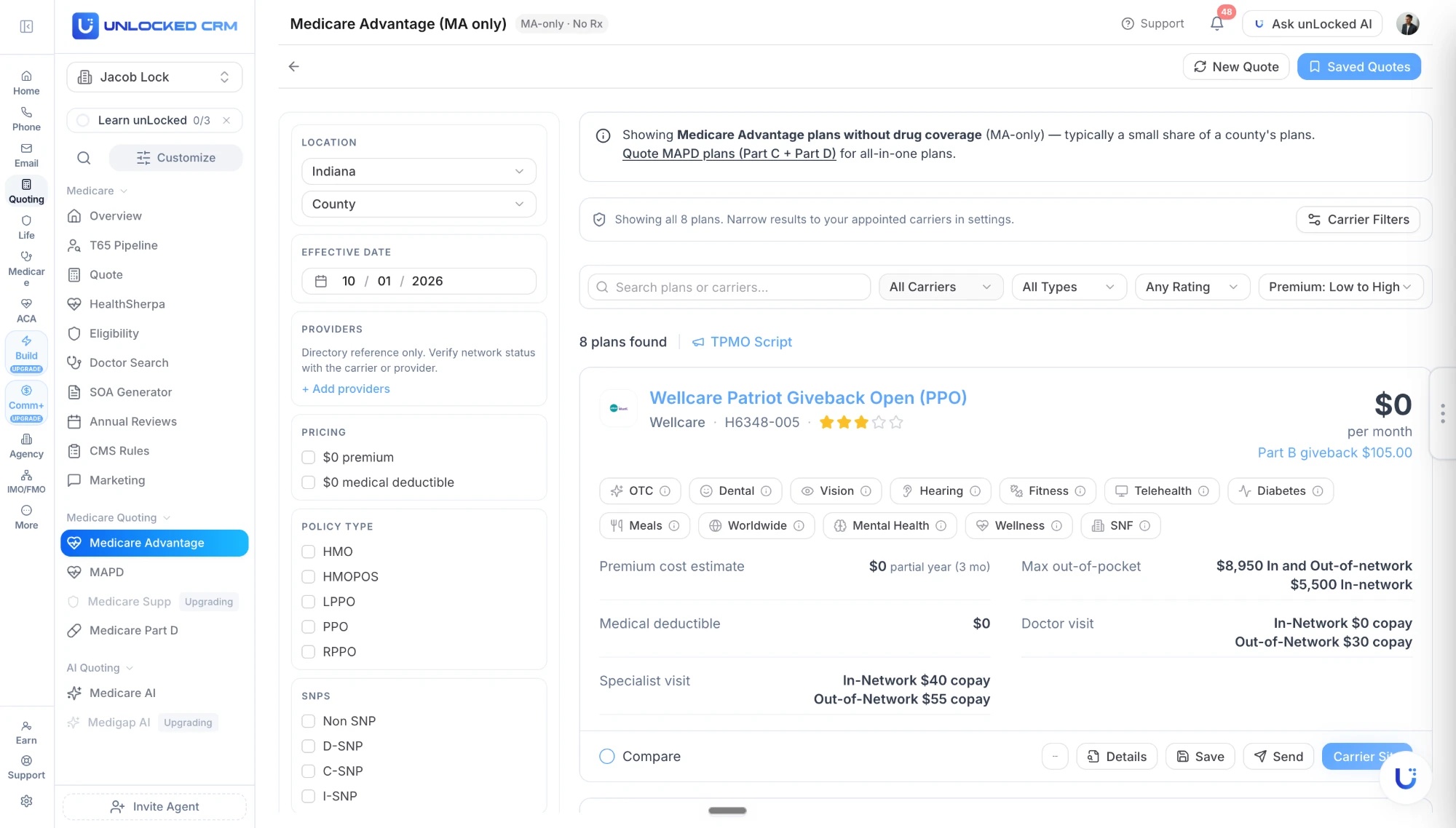
Everything the Client Asks About, On One Plan Card.
Pick the county and effective date, and every MA-only plan comes back with the details that decide the conversation.
Premium and Part B giveback
Monthly premium, the partial-year cost estimate for the effective date you chose, and any Part B giveback, right on the card.
Supplemental benefits at a glance
OTC, dental, vision, hearing, fitness, telehealth, diabetes, meals, worldwide, mental health, wellness, and SNF, each with a detail popover.
Costs that decide the sale
Max out-of-pocket in and out of network, medical deductible, and doctor and specialist copays, side by side across plans.
Star rating and plan ID
CMS Star Rating and the H-number on every plan, so the client sees the same identifiers Medicare.gov shows.
Filters that match how you sell
Carrier, policy type (HMO, HMO-POS, LPPO, PPO, RPPO), SNP type (D-SNP, C-SNP, I-SNP), $0 premium, $0 deductible, rating, and premium sort.
Compare, send, enroll
Tick plans to compare, download the PDF, send the quote to the client by email or SMS, and enroll. Depending on your enrollment platform, the enrollment is pushed straight into it.
Non-Commissionable Plans, Flagged Before You Present.
Stop enrolling clients into plans that pay $0. The quoter identifies them before they reach the comparison, with no maintenance on your end.
Instant $0-commission detection on every search
Hide non-commissionable plans with one toggle, with the hidden count shown
Carrier-specific plan IDs and county-level restriction rules
D-SNP, employer group, and carrier flags across all 50 states
The Medicare Advantage Workflow, Lead To Commission
How a case moves from first contact to commission on one client record, and what the AI handles along the way.
See all 12 lines on Insurance Workflows By Product Line.
New In November 2026
Recently shipped here. Every release is on the Product Updates page.
Medicare Advantage Quoting And Enrollments With AI Prefill
Medicare Advantage quoting and enrollments now include an AI Prefill step.
Telephonic Scope Of Appointment
Capture a Scope of Appointment by recorded verbal consent on the call.
Client Portal: Medicare Intake Tab
The client portal has a Medicare intake tab for medications, doctors, and pharmacy.
Read more: Telephonic Scope of Appointment
Drugs, Pharmacies, and Doctors, Added in Seconds.
Add the client's drugs, pharmacies, and providers on every Medicare quoter. AI Drug Assist and AI Doctor Assist take the lists however they arrive, structure them, and match them for the quote. No one-at-a-time entry.
Paste or upload
Paste a text list or upload an image of medications, pharmacies, or providers.
Voice
Dictate the list during the client call and AI structures it.
Photo
Snap pill bottles, a pharmacy printout, or a referral sheet.
Quote, Compare, and Enroll in Four Steps.
01
Open the client record
Start from the contact. County, effective date, and any saved providers carry into the quoter.
02
Run the MA quote
MA-only plans for the county, ranked by premium, with benefits, costs, ratings, and commission flags on each card.
03
Compare and send
Tick plans to compare, use the TPMO script, and send the client a branded PDF comparison by email or SMS.
04
Enroll and follow up
Enroll from the plan card. Depending on your enrollment platform, the enrollment is pushed into it, and the plan and next review land on the record.
Built for Real Medicare Workflows.
The pieces around the quote that usually live in three other tabs.
Eligibility and effective dates
Age-based eligibility checks and effective-date guidance so coverage starts when it can.
ACA to Medicare transitions
Clients approaching 65 are flagged, with a countdown and guided steps that keep the ACA history intact.
TPMO script and CMS rules
The TPMO disclosure is one click from the results, and CMS rules are built into the Medicare workflow.
Branded PDF quotes
Every comparison PDF carries your logo, name, NPN, and phone without any formatting on your end.
Enrollment pushed to your platform
Enroll from the plan card and, depending on your enrollment platform, the enrollment is pushed into it. Carrier links and plan documents stay on the quote.
Ready for AEP, OEP, and SEP
New enrollments, annual reviews, and mid-year changes all run from the same quoter and the same record.
Three Ways to Quote Medicare.
Same plans, same client record. Pick the path that fits the moment.
The MA quoter
Every plan
Form-based, county-level MA-only quoting, unlimited and with no per-quote fee. What you see on this page.
Medicare AI
Pro
Describe the client in plain English and get plan recommendations. unLocked AI can run it from chat or by voice.
Your Medicare quoting link
Every plan
A custom link with your name, headshot, and logo. The client quotes themselves and lands in your CRM as a lead with the quote attached.
Medicare Advantage FAQ
Can I submit Medicare Advantage e-Apps inside unLocked?
Yes. Medicare Advantage e-Apps are live in unLocked CRM. Start the application from the plan you quoted with client, county, and plan details carried over, collect the signature on the client's phone, and the signed application and status file on the client record. included on Core. See eApps & eSign at /documents-eapps.
What is the difference between the MA quoter and the MAPD quoter?
The MA quoter shows Medicare Advantage plans without drug coverage, which are typically a small share of a county's plans. For all-in-one plans with Part D, use the MAPD quoter. Both run from the same Medicare Quoting menu and save to the same client record.
Which plan types can I quote?
HMO, HMO-POS, LPPO, PPO, and RPPO plans, including D-SNP, C-SNP, and I-SNP Special Needs Plans, for the county and effective date you choose.
How does non-commissionable plan detection work?
The quoter checks each plan against carrier-specific plan IDs, county-level restrictions, and D-SNP, employer group, and carrier flags across all 50 states, marks the $0-commission plans, and lets you hide them with one toggle while showing how many are hidden.
Can I add the client's drugs, pharmacies, and doctors?
Yes, on every Medicare quoter. Add them by pasting a list, speaking it, or photographing a pill bottle, pharmacy printout, or referral sheet, and AI structures the entries. Providers show network status per plan; directories are reference only, so verify with the carrier before enrolling.
How do I send a quote and enroll the client?
Download the quote as a PDF or send it to the client by email or SMS from the results page. To enroll, use the plan card; depending on your enrollment platform, the enrollment is pushed into that platform, and the quote and enrollment stay on the client record. The TPMO script is one click away.
Is the Medicare Advantage quoter included?
Yes. It is included on every unLocked CRM plan, priced per user, with unlimited quotes. Medicare AI, the plain-English version, is on Pro.
Can clients quote themselves?
Yes. Every agent gets a custom Medicare quoting link branded with their name, headshot, and logo. The client runs the comparison and lands in the CRM as a lead with the quote attached.
Choosing Medicare Advantage Quoting Software
Medicare Advantage quoting software should compare available plans for the client's county and effective date, including premium, benefits, provider fit, and out-of-pocket exposure. unLocked's MA-only quoter saves the comparison on the contact record and shows Part B givebacks, MOOP, Star Ratings, and non-commissionable flags. Use the separate MAPD quoter when drug coverage is included.
- Separate MA-only plans from MAPD and standalone Part D so the comparison matches the coverage the client needs.
- Compare premium, medical deductible, MOOP, copays, and supplemental benefits—not just the $0 premium label.
- Review provider network status and verify it with the carrier before enrollment.
- Check enrollment eligibility, required disclosures, and documentation before proceeding to an application.
Check It In A Demo
Open a Medicare contact, select the county and effective date, compare two MA-only plans, review the provider information, and save the client-ready comparison.
Plan and provider availability varies. Directories are reference material, not a guarantee of network participation. Software supports recordkeeping; the licensed agent remains responsible for current CMS and carrier requirements.